Product · Engineering · 2026
PMHelper — running a whole team from one tool
I forked an abandoned open-source project and turned it into a production project-management system with QA gates, OKR tracking, a mobile app, and a Claude MCP server. Five people depend on it every day.
I built PMHelper to run my team’s project work in one place. It handles tickets, kanban boards, QA workflows, daily and weekly reports, OKR and KPI tracking, team messaging, and a mobile app. I forked it from an abandoned open-source project and turned it into a production system. Today five real users depend on it every day.
The problem
My team spread work across too many tools. Tickets lived in one place. Reports lived in chat. Performance reviews lived in spreadsheets. Nobody had a single view.
I wanted four things: one place for tickets, reports, and reviews; real role-based access so a developer cannot do a stakeholder’s job; a QA workflow that blocks bad work before it ships; and objective performance data based on OKR and KPI, not opinion.
Off-the-shelf tools cost money per seat and did not match how I run QA. So I built my own.
The starting point
I forked devaslanphp/project-management. The upstream project died in March 2024. I took the base and rebuilt it. I chose Laravel and Filament because I already knew them — that let me ship features in days, not weeks.
| Layer | Choice |
|---|---|
| Framework | Laravel 9.19 |
| Admin panel | Filament v2.16 |
| Language | PHP 8.3 |
| Access control | Spatie laravel-permission |
| Realtime UI | Livewire + Pusher |
| Frontend | Tailwind CSS 3, Vite 3 |
| Database | MySQL |
Role-based access
I set up six production roles. Every policy checks the user’s role before it allows a delete, an edit, or a status change. A developer cannot start a sprint. A stakeholder cannot move a ticket to QA. The rules live in the database, not in hardcoded arrays, so I can change them without a deploy.
| Role | Permissions |
|---|---|
| Super Admin | 69 |
| Project Manager | 36 |
| QA / Tester | 27 |
| DevOps | 24 |
| Developer | 23 |
| Stakeholder | 14 |
The ticket system
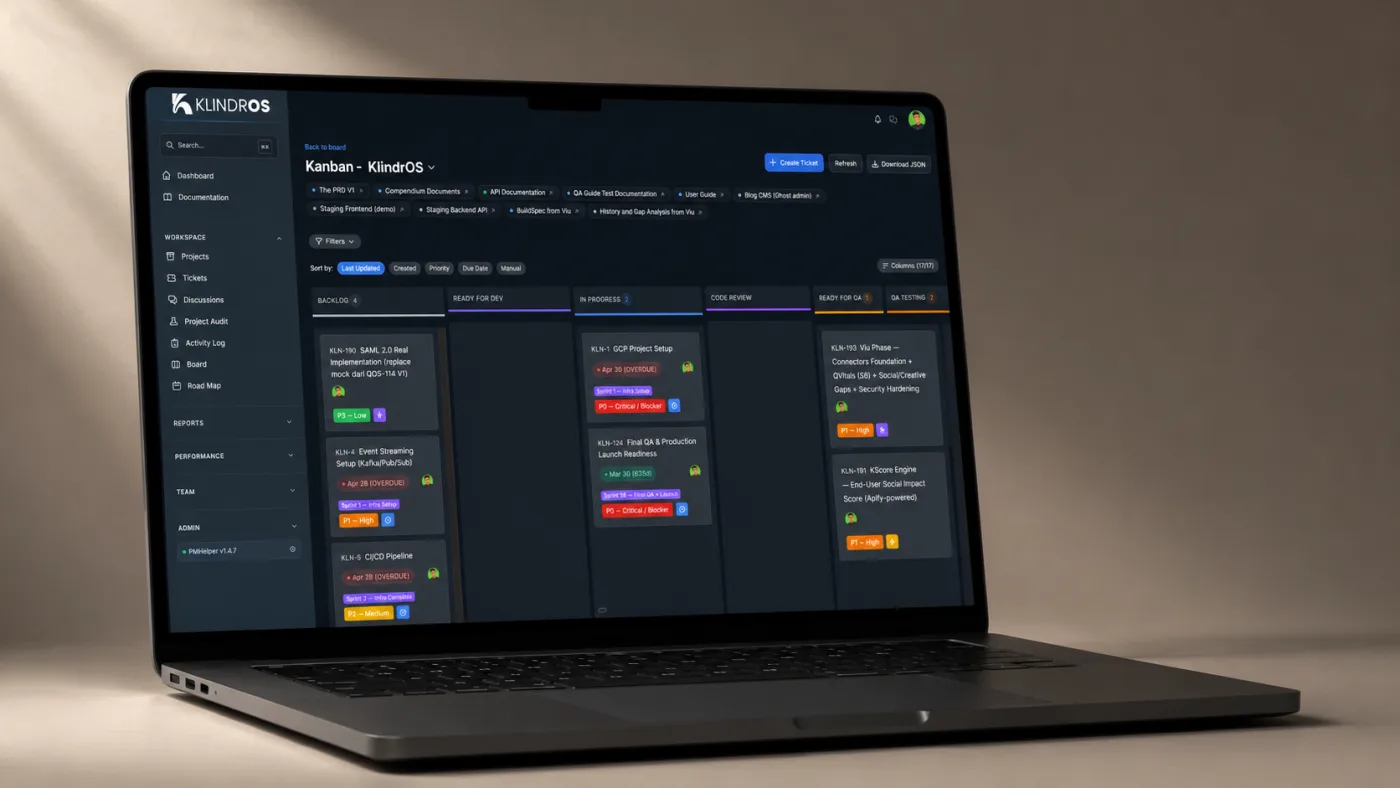
The ticket system is the core. I designed it around a three-layer pipeline: Dev, then QA, then Business. It has 15 statuses, and each status belongs to a role group. A ticket only moves to the next status if your role owns that group. This stops a developer from marking their own bug as QA Passed.
It carries 9 ticket types (Bug, Task, Feature, Improvement, Sub-task, Epic, Spike, Hotfix, QA Test Case) and 4 priority levels (P0 Critical to P3 Low). Each ticket carries a QA checklist with pass, fail, and pending items. A ticket cannot reach QA Passed until QA clears the checklist. That rule is what keeps quality high. Developers log time with a /spend command inside comments.
Reports that write themselves
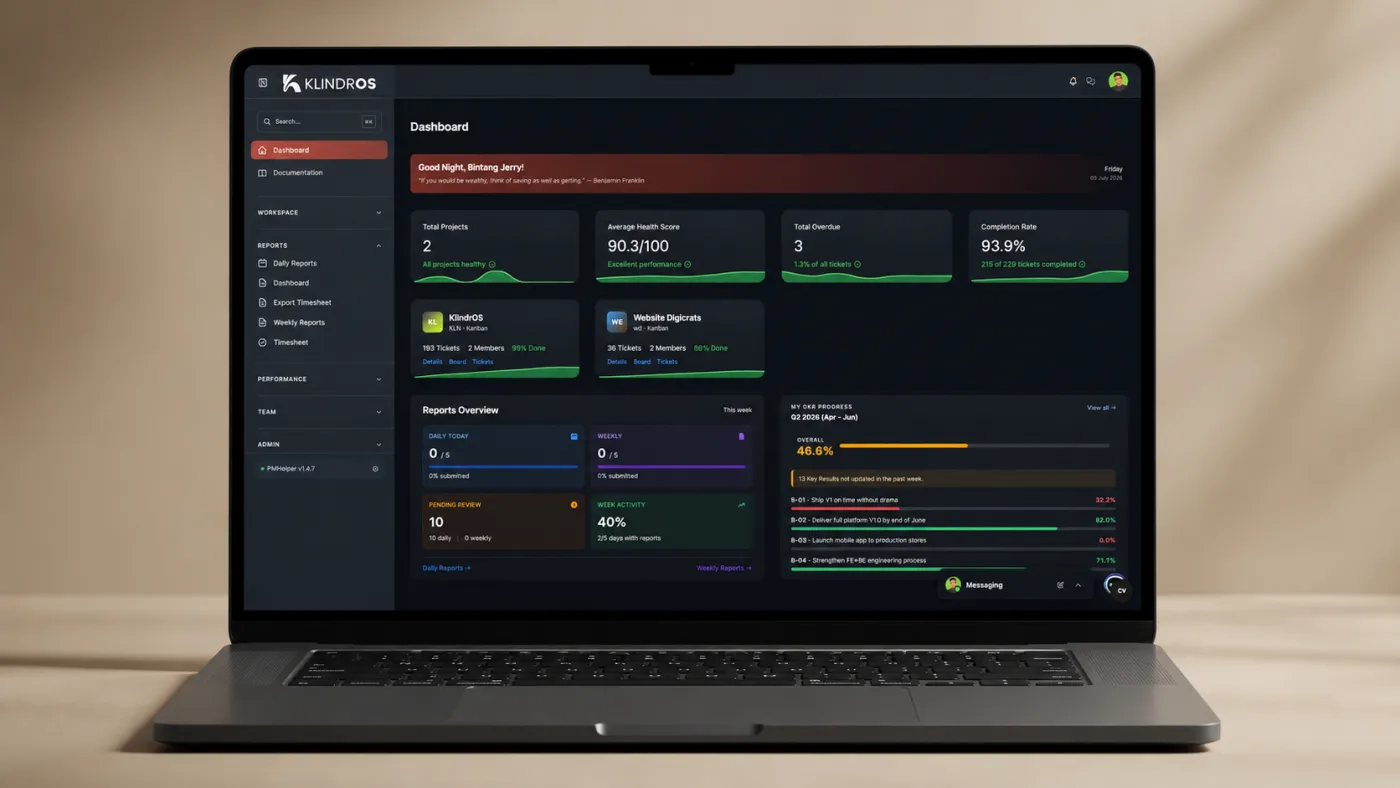
I added daily and weekly reports so I can see progress without asking for it. Weekly reports auto-generate a summary from ticket, activity, and timesheet data — a completion rate and a breakdown by status, type, and project. Reports follow a workflow: Draft → Submitted → Acknowledged. When you submit, the system notifies the Project Manager and Super Admin.
OKR and KPI
This module answers one question: how do I evaluate people fairly? I shipped it across four sprints in a single day. The weight rules keep the math honest — objectives per user per period must sum to 100%, and key results per objective must sum to 100%. The system rejects anything over 100%.
Progress comes from three sources: manual entry, weekly reports, and automatic calculation. Automatic key results pull data from tickets and reports through pluggable adapters, and a scheduled command recalculates them every hour. The review flow runs in two steps — you score yourself, then your supervisor finalizes it — and the final score rolls up as objective weight × key-result weight × per-key-result score.
When review time comes, I look at achievement scores, not memory.
Messenger, meetings, and a mobile app
I added one-on-one messaging inside the app so the team stops jumping to external chat — images, link previews, file attachments, broadcast in real time through Pusher. I embedded Jitsi Meet for video calls that run inside the app, capture a live transcript, and auto-summarize the call when it ends.
Web stays my primary surface, but I wanted native clients for the six core modules. I built the app with Expo SDK 54, React Native, and TypeScript, sharing the backend through a REST API with 37 endpoints and Sanctum token auth. I gave it a warm editorial dark design on purpose — a terracotta accent and serif headlines, because most PM tools look cold and generic. The app subscribes to the same realtime kanban channel as the web, so when someone moves a ticket, the board updates on the phone.
An MCP server for Claude
I exposed a Model Context Protocol endpoint at /api/mcp. It gives Claude 14 tools — list and create tickets, update status, add comments, work with discussions, file daily reports. Every tool checks the same permissions as the web UI, so Claude cannot do anything the user cannot do. The team fetches ticket state and adds comments without leaving their editor.
Results
- 5 users run daily work through it
- 6 roles with database-driven policies
- 15 QA-gated ticket statuses
- 37 REST endpoints powering the app
The QA checklist blocks tickets from shipping without a sign-off — quality now has a gate, not a hope. Weekly reports write themselves from ticket data, so I stopped chasing people for status updates. The OKR module gives me objective performance data. The mobile app and MCP server extend the same data to phones and to Claude, so the team works where they already are.
Lessons I learned
Filament v2 uses Heroicons v1, not v2 — half my icon names failed until I learned this. Spatie settings crash the app when a new property has no database row, so I insert the row with raw SQL before I deploy. New Tailwind classes render as nothing until I rebuild on the server, because the build folder is gitignored. Eloquent accessors override SQL computed columns in union queries, so I bypass them with getAttributes() when I need the raw value. I write each lesson into a memory file, so every new feature costs me less.
If you want to build something like this, start with the workflow you actually run. Match the tool to your process — not your process to a tool.